Implementing Hover
Next up is implementing the textDocument/Hover method.
This method is called when the user hovers over a symbol in the editor, or for neovim users a user might press K in normal mode.
The server should respond with a hover object that contains the hover information.
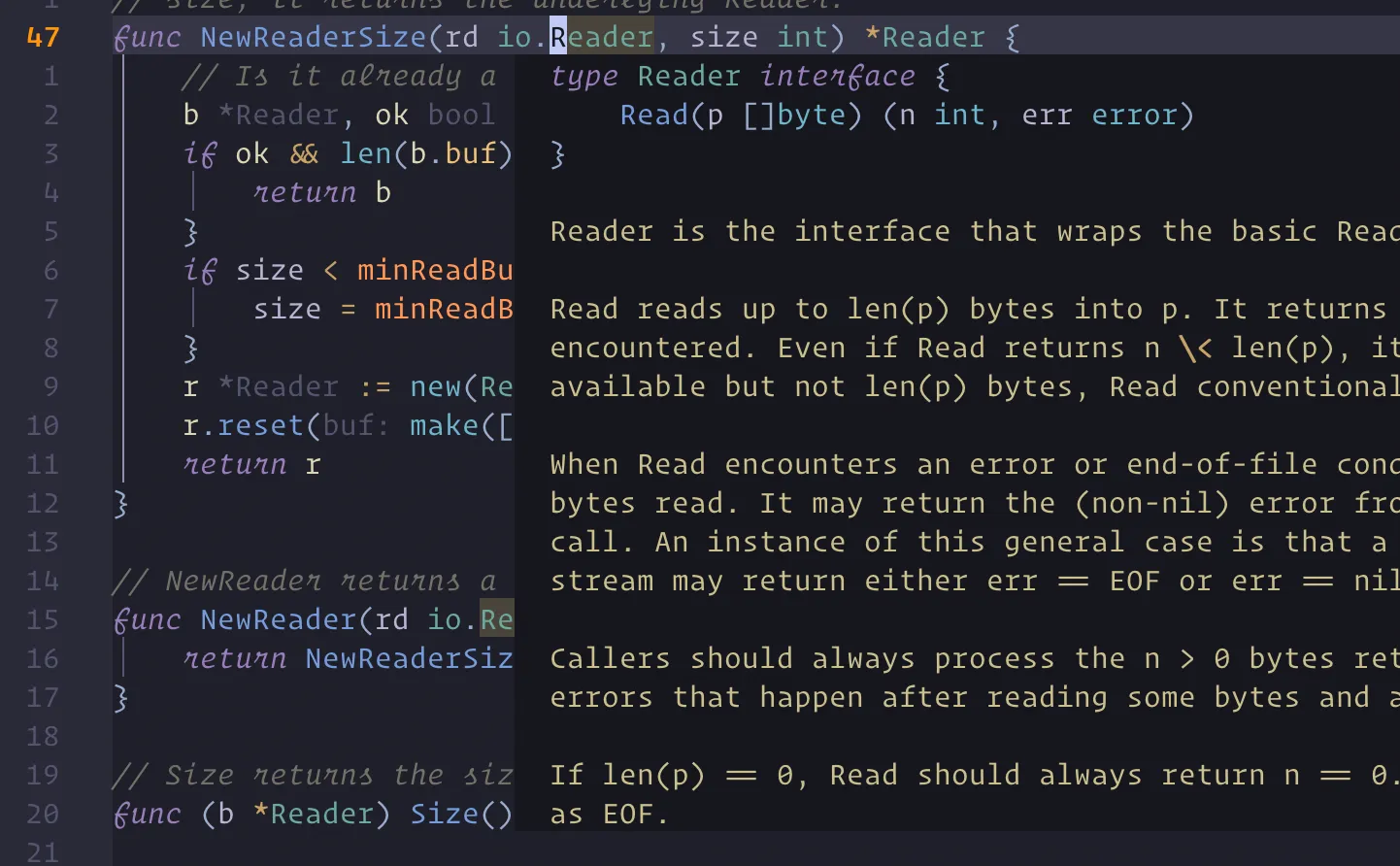
Hover Types
Lets checkout Microsofts documentation on the hover method.
Skip the client capabilities and the response part for now.
We see that the request HoverParams extends two other types TextDocumentPositionParams and WorkDoneProgressParams.
So we know we need to create these interfaces in order to decode the request body and actually do something with it.
Let’s start there, one great thing about these docs is that you can simply click on the types and go to their definition just like an editor.
We’ll create two new files and add the following (converted from the typescript docs to go lang)
touch lsp/hover.gopackage lsp
type HoverRequest struct { Request Params HoverParams `json:"params"`}
type HoverParams struct { TextDocumentPositionParams}
type HoverResponse struct { Response Result HoverResult `json:"result"`}
type HoverResult struct { Contents string `json:"contents"`}Now to tell our client that we support the hover method we need to add it to the ServerCapabilities struct.
type ServerCapabilities struct {  TextDocumentSync int  `json:"textDocumentSync"`  HoverProvider    bool `json:"hoverProvider"`}

// ... other code...
func NewInitializeResponse(id int) InitializeResponse {  return InitializeResponse{    Response: Response{      Id:      &id,      Jsonrpc: "2.0",    },    Result: InitializeResult{      Capabilities: ServerCapabilities{        TextDocumentSync: 1,        HoverProvider:    true,      }, // what we're able to do      ServerInfo: ServerInfo{        Name:    "demo_lsp", // name of lsp        Version: "0.0.0.0",  // version of lsp      },    },  }}
Helpers
So with that setup, you can probably guess what the next step is.
We need to go back to main.go to add the method to our switch statement, but first, we need to write a helper function.
In state.go add the following as well as a new utils directory with a is_whitespace.go file.
func (s *State) GetWordFromRange(uri string, textDocumentPositionParams lsp.TextDocumentPositionParams) string {  doc := s.Documents[uri]
  lines := strings.Split(doc, "\n")  currentLine := lines[textDocumentPositionParams.Position.Line]
  selectedWord := ""
  // prepend letter  for i := textDocumentPositionParams.Position.Character; i >= 0; i-- {    currentByte := currentLine[i]    if util.IsWhitespace(currentByte) {      break    }    selectedWord = string(currentByte) + selectedWord  }
  // append letters  for i := textDocumentPositionParams.Position.Character + 1; i < len(currentLine); i++ {    currentByte := currentLine[i]
    if util.IsWhitespace(currentByte) {      break    }
    selectedWord = selectedWord + string(currentByte)  }
return selectedWord}package util
func IsWhitespace(c byte) bool { return c == ' ' || c == '\t' || c == '\n' || c == '\r'}Updating main.go
Finally in main.go add the following to the switch statement after out textdocument method checks.
  case "textDocument/hover":    logger.Println("Hover Request")    var hoverRequest lsp.HoverRequest
    if err := json.Unmarshal(content, &hoverRequest); err != nil {      logger.Printf("Error unmarshalling hover request: %s\n", err)      return    }
    hoveredWord := state.GetWordFromRange(hoverRequest.Params.TextDocument.Uri, hoverRequest.Params.TextDocumentPositionParams)
    // reply with the word    hoverResponse := lsp.NewHoverResponse(*hoverRequest.Id, hoveredWord)    writeResponse(hoverResponse, writer, logger)  }
Result
Finally lets rebuild and see it in action!
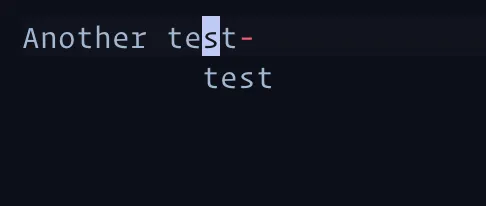
So we have a hover window that shows the word our cursor is on. Not super amazing so far but we’re just getting started.